No products in the cart.
Blog
Master Your Brother Embroidery Machine: 10 Essential Tips & Tricks
11
Dec
Dec
Your new Brother embroidery machine is a gateway to incredible creativity, but getting started can feel a little daunting. From understanding the settings to choosing the right supplies, a few key pieces of knowledge can make all the difference. This guide will walk you through the essential setup, operation, and troubleshooting tips you need to create flawless projects and get the most from your Brother machine, right from the very first stitch.
Getting Started: Your First Steps to Success
A great project starts with a great setup. Taking a few moments to properly prepare your machine and materials will save you headaches later and ensure your embroidery looks professional every time. Let’s cover the foundational steps.
Choosing the Right Needles and Thread
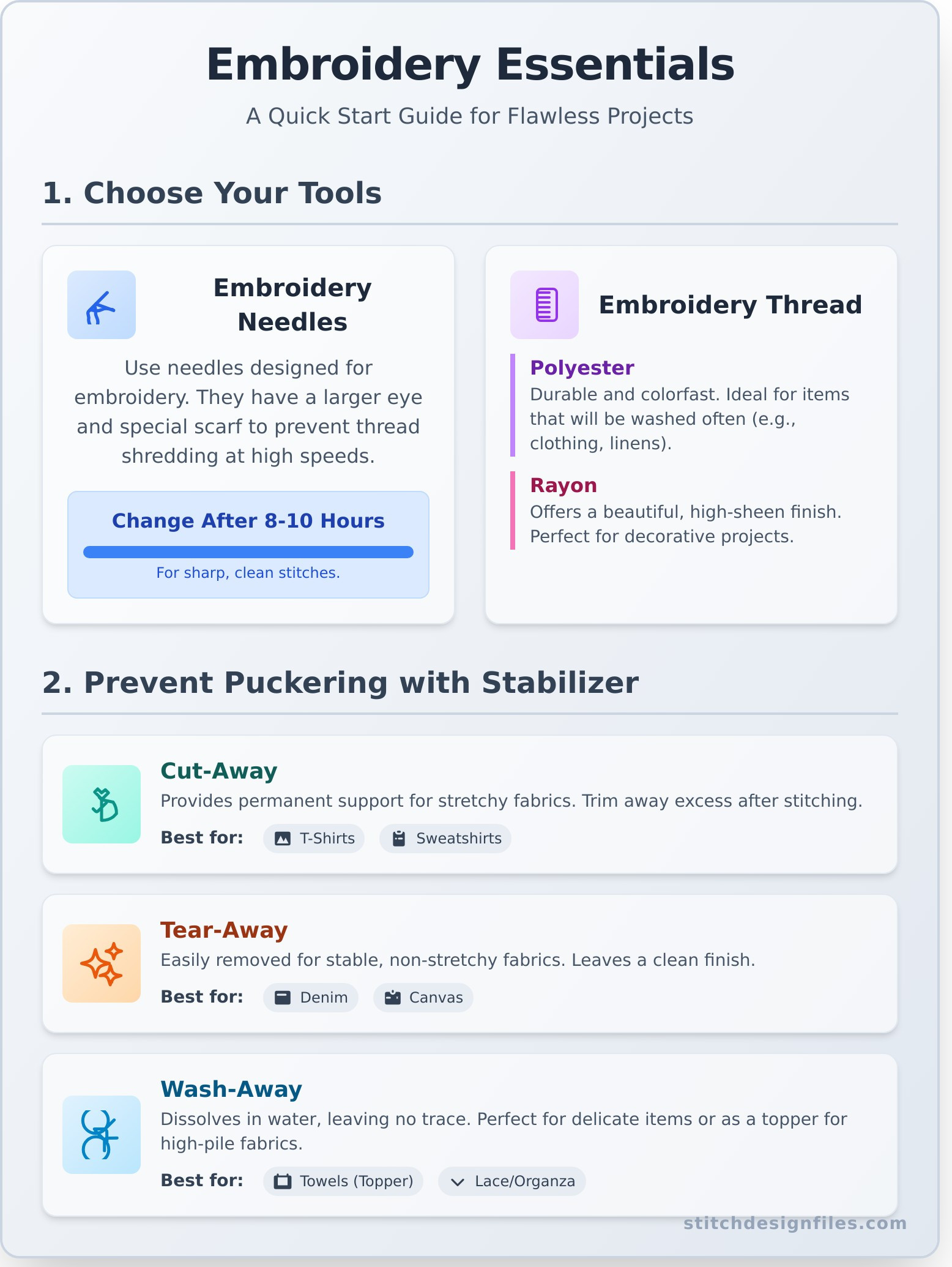
It might seem like a small detail, but your needle and thread are the stars of the show. Using embroidery-specific needles is crucial for quality; they have a special scarf and a larger eye designed to prevent thread from shredding at high speeds. For thread, you’ll mainly choose between polyester and rayon. Polyester is durable and colorfast, making it great for items that will be washed often, while rayon offers a beautiful, high-sheen finish. As a rule of thumb, you should change your machine’s needle after every 8-10 hours of embroidery to keep your stitches sharp and clean.
The Magic of Stabilizer: Stop Fabric Puckering
Ever wondered how to get crisp, flat embroidery without the fabric bunching up? The secret is stabilizer. This special backing material provides the support your fabric needs to handle dense stitching. There are several common types, including cut-away (which offers permanent support for stretchy fabrics), tear-away (easily removed for stable fabrics like denim), and wash-away (which dissolves in water, perfect for delicate items like towels or free-standing lace). Matching the stabilizer to your fabric is the key to preventing puckering.
| Fabric Type | Recommended Stabilizer |
|---|---|
| T-Shirts, Sweatshirts (Knits) | Cut-Away |
| Denim, Canvas, Twill (Wovens) | Tear-Away |
| Towels, Fleece (High Pile) | Wash-Away (as a topper) + Cut-Away/Tear-Away |
| Delicate Fabrics (Organza, Silk) | Wash-Away |
From Digital File to Stitched Design
The real fun begins when you turn your creative ideas into beautifully stitched reality. This process involves a simple digital workflow, from getting a design file onto your machine to watching it come to life on your fabric.
Understanding Brother File Formats (.PES)
Every embroidery machine brand speaks its own language, and for Brother, that language is the .PES file format. This file contains all the stitch information your machine needs to create the design. While you might encounter other formats like .DST, you will almost always need to ensure your designs are in the .PES format to work on your machine. Most design software and online stores provide multiple formats for this reason.
How to Load Designs onto Your Machine
Getting your design file from your computer to your machine is simple. The most common method is to save the .PES file onto a USB stick, which you then insert into the machine. Some newer Brother models also allow you to connect directly to a computer via a USB cable. Once loaded, you can use the machine’s intuitive LCD screen to select the design, position it precisely where you want it on the hooped fabric, and even make minor edits like rotating or resizing.
Where to Find High-Quality Embroidery Designs
Your Brother machine comes with a fantastic selection of built-in designs, which are perfect for learning and getting started on your first projects. But when you’re ready to tackle something truly unique, the best place to look is an online design store. For unique projects that stand out, you can find thousands of professionally crafted, ready-to-use files perfect for any occasion. Ready to get inspired? Explore our instant-download embroidery designs!
Troubleshooting Common Embroidery Problems
Even experienced embroiderers run into issues sometimes. Don’t get frustrated! Most common problems have simple fixes that will get you back to stitching in no time.
Fixing Thread Breaks and Bird’s Nests
Sudden thread breaks or a tangled mess of thread on the underside of your fabric (a “bird’s nest”) are the most frequent issues. Before you panic, check the basics: Is the machine threaded correctly? Is the needle inserted properly and not bent or dull? Often, re-threading the machine is all it takes. You can also try adjusting the upper thread tension slightly. Finally, a surprising number of problems are caused by lint buildup, so a quick cleaning of the bobbin case is always a good idea.
Basic Machine Maintenance for Longevity
A little care goes a long way in keeping your machine running smoothly. Make it a habit to regularly clean lint from the bobbin area and around the needle with a small brush. Some machines require occasional oiling; always check your user manual to see if this is necessary and where to apply the oil. When you’re not using it, protect your investment from dust by keeping it covered.
Frequently Asked Questions
What file format does a Brother embroidery machine use?
Brother embroidery machines primarily use the .PES file format. While they may sometimes recognize other formats like .DST, it’s always best to use .PES files for full compatibility.
Can I use regular sewing thread for machine embroidery?
It’s not recommended. Regular sewing thread is typically thicker and not designed to withstand the high speed and friction of machine embroidery, which can lead to frequent thread breaks and a less polished look.
How do I know which stabilizer to use for my project?
The general rule is to match the stabilizer weight to the fabric weight and choose the type based on the fabric’s properties. Use cut-away for stretchy knits, tear-away for stable wovens, and wash-away for delicates or high-pile fabrics like towels.
Why is my fabric puckering around the embroidery?
Puckering is almost always caused by improper stabilization. This can mean you’re using the wrong type of stabilizer, a weight that’s too light for the design’s density, or you haven’t hooped the fabric and stabilizer tightly enough.
How often should I change the needle in my embroidery machine?
A good practice is to install a fresh needle after 8-10 hours of embroidery time or before starting a large, important project. A dull needle can cause skipped stitches and shredded thread.
Are all embroidery designs compatible with Brother machines?
As long as the design is available in the .PES file format and the design’s dimensions fit within your machine’s maximum embroidery area (hoop size), it should be compatible.
Now that you’re armed with these essential tips, you’re ready to unlock the full potential of your Brother embroidery machine. The most important step is to have fun and start creating. Don’t be afraid to experiment with different fabrics, threads, and designs. Bring your ideas to life! Shop thousands of compatible designs.
